分类器的准确率
要了解我们的分类器表现如何,我们可以将 50% 的数据放入训练集,另外 50% 放入测试集。基本上,我们预留一些数据以备后用,以便可以用来衡量分类器的准确率。我们一直称其为“测试集”。有时人们会将你留出用于测试的数据称为“留出集”,并将这种估计准确率的策略称为“留出法”。
注意,这种方法需要严格的纪律。在开始应用机器学习方法之前,你必须取一部分数据并将其留出用于测试。你必须避免使用测试集来开发分类器:你不应该用它来帮助训练分类器、调整其设置或集思广益改进分类器。相反,你应该只在最后,在完成分类器后,当你想对其准确率进行无偏估计时,使用一次。
import matplotlib
#matplotlib.use('Agg')
path_data = '../../../assets/data/'
from datascience import *
%matplotlib inline
import matplotlib.pyplot as plt
from mpl_toolkits.mplot3d import Axes3D
import numpy as np
import math
import scipy.stats as stats
plt.style.use('fivethirtyeight')def distance(point1, point2):
"""Returns the distance between point1 and point2
where each argument is an array
consisting of the coordinates of the point"""
return np.sqrt(np.sum((point1 - point2)**2))
def all_distances(training, new_point):
"""Returns an array of distances
between each point in the training set
and the new point (which is a row of attributes)"""
attributes = training.drop('Class')
def distance_from_point(row):
return distance(np.array(new_point), np.array(row))
return attributes.apply(distance_from_point)
def table_with_distances(training, new_point):
"""Augments the training table
with a column of distances from new_point"""
return training.with_column('Distance', all_distances(training, new_point))
def closest(training, new_point, k):
"""Returns a table of the k rows of the augmented table
corresponding to the k smallest distances"""
with_dists = table_with_distances(training, new_point)
sorted_by_distance = with_dists.sort('Distance')
topk = sorted_by_distance.take(np.arange(k))
return topk
def majority(topkclasses):
ones = topkclasses.where('Class', are.equal_to(1)).num_rows
zeros = topkclasses.where('Class', are.equal_to(0)).num_rows
if ones > zeros:
return 1
else:
return 0
def classify(training, new_point, k):
closestk = closest(training, new_point, k)
topkclasses = closestk.select('Class')
return majority(topkclasses)wine = Table.read_table(path_data + 'wine.csv')
# For converting Class to binary
def is_one(x):
if x == 1:
return 1
else:
return 0
wine = wine.with_column('Class', wine.apply(is_one, 0))衡量葡萄酒分类器的准确率
好的,让我们应用留出法来评估 $k$-最近邻分类器识别葡萄酒的有效性。数据集有 178 种葡萄酒,因此我们将随机排列数据集,将其中 89 种放入训练集,其余 89 种放入测试集。
shuffled_wine = wine.sample(with_replacement=False)
training_set = shuffled_wine.take(np.arange(89))
test_set  = shuffled_wine.take(np.arange(89, 178))
我们将使用训练集中的 89 种葡萄酒训练分类器,并评估它在测试集上的表现。为了让我们的生活更轻松,我们将编写一个函数来评估分类器在测试集中每种葡萄酒上的表现:
def count_zero(array):
    """Counts the number of 0's in an array"""
    return len(array) - np.count_nonzero(array)

def count_equal(array1, array2):
    """Takes two numerical arrays of equal length
    and counts the indices where the two are equal"""
    return count_zero(array1 - array2)

def evaluate_accuracy(training, test, k):
    test_attributes = test.drop('Class')
    def classify_testrow(row):
        return classify(training, row, k)
    c = test_attributes.apply(classify_testrow)
    return count_equal(c, test.column('Class')) / test.num_rows
现在到了揭晓时刻——让我们看看我们的表现如何。我们任意选择 $k=5$。
evaluate_accuracy(training_set, test_set, 5)0.898876404494382对于一个简单的分类器来说,这个准确率一点也不差。
乳腺癌诊断
现在我想做一个基于乳腺癌诊断的示例。我的灵感来自 Brittany Wenger,她在 2012 年以 17 岁高中生的身份赢得了 Google 全国科学展。这是 Brittany:
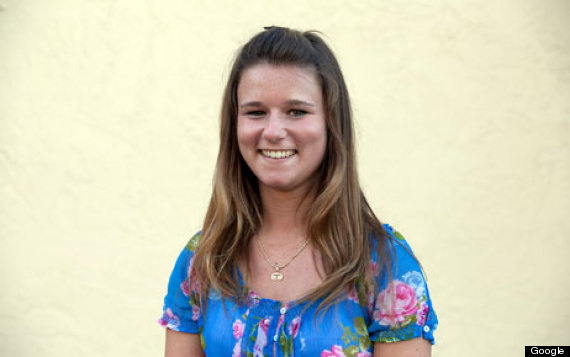
Brittany 的科学展项目是构建一个分类算法来诊断乳腺癌。她因构建了一个准确率接近 99% 的算法而获得了大奖。
让我们看看,利用本课程中学到的知识,我们能做得多好。
那么,让我给你介绍一下这个数据集。基本上,如果一位女性的乳房有肿块,医生可能想要进行活检以确定是否为癌性。有几种不同的方法可以做到这一点。Brittany 专注于细针穿刺抽吸(FNA),因为它比其他方法创伤更小。医生获取肿块样本,放在显微镜下,拍照,然后由训练有素的实验室技术人员分析图片以确定是否为癌症。我们会得到类似以下之一的图片:


不幸的是,区分良性和恶性可能很棘手。因此,研究人员研究了使用机器学习来帮助完成这项任务。思路是让实验室技术人员分析图像并计算各种属性:比如细胞的典型大小、细胞大小之间的变异程度等等。然后,我们将尝试利用这些信息来预测(分类)样本是否为恶性。我们有一个训练集,其中已知正确的诊断结果:212 名患者患有癌症,357 名患者的情况是良性的。因此,我们有 569 个训练样本,每个样本都有从照片计算出的属性。这是一个公开可用的数据集,如果你愿意,可以自由查看。(这是一个经典的机器学习数据集,可从 UCI 机器学习库获得。)
patients = Table.read_table(path_data + 'breast-cancer.csv').drop('ID')
patients
Clump Thickness | Uniformity of Cell Size | Uniformity of Cell Shape | Marginal Adhesion | Single Epithelial Cell Size | Bare Nuclei | Bland Chromatin | Normal Nucleoli | Mitoses | Class
5 | 1 | 1 | 1 | 2 | 1 | 3 | 1 | 1 | 0
5 | 4 | 4 | 5 | 7 | 10 | 3 | 2 | 1 | 0
3 | 1 | 1 | 1 | 2 | 2 | 3 | 1 | 1 | 0
6 | 8 | 8 | 1 | 3 | 4 | 3 | 7 | 1 | 0
4 | 1 | 1 | 3 | 2 | 1 | 3 | 1 | 1 | 0
8 | 10 | 10 | 8 | 7 | 10 | 9 | 7 | 1 | 1
1 | 1 | 1 | 1 | 2 | 10 | 3 | 1 | 1 | 0
2 | 1 | 2 | 1 | 2 | 1 | 3 | 1 | 1 | 0
2 | 1 | 1 | 1 | 2 | 1 | 1 | 1 | 5 | 0
4 | 2 | 1 | 1 | 2 | 1 | 2 | 1 | 1 | 0
... (673 rows omitted)因此,我们有 9 个不同的属性。我不知道如何制作所有属性的九维散点图,所以我将选择两个并绘制它们:
color_table = Table().with_columns(
    'Class', make_array(1, 0),
    'Color', make_array('darkblue', 'gold')
)
patients_with_colors = patients.join('Class', color_table)patients_with_colors.scatter('Bland Chromatin', 'Single Epithelial Cell Size', group='Color')Scatterplot with 'Bland Chromatin' on the x-axis and 'Single Epithelial Cell Size' on the y-axis with a grid of data points in either dark blue or gold of varying levels of transparency. Most data points are dark blue, and the gold data points exist towads the very bottom of the graph or towards the very left of the graph. Not all data points on the bottom or the left are gold, some are dark blue.哎呀。这个图完全具有误导性,因为有一批点的 x 和 y 坐标值完全相同。为了更容易看到所有数据点,我将向 x 和 y 值添加一点随机抖动。结果如下:
def randomize_column(a):
    return a + np.random.normal(0.0, 0.09, size=len(a))
Table().with_columns(
        'Bland Chromatin (jittered)',
        randomize_column(patients.column('Bland Chromatin')),
        'Single Epithelial Cell Size (jittered)',
        randomize_column(patients.column('Single Epithelial Cell Size')),
        'Class', patients.column('Class')
    ).join('Class', color_table).scatter(1, 2, group='Color')
Scatterplot with 'Bland Chromatin (jittered)' on the x-axis and 'Single Epithelial Cell Size (jittered)' on the y-axis. Now the grid of data points isn't as perfect, but the datapoints are clustered closely around discrete (x, y). We again see gold data points only towards the bottom of the graph and towards the left, however this time we see that some gold data points exist in the same jittered group as some dark blue data points.例如,你可以看到有很多样本的染色质 = 2 且上皮细胞大小 = 2;全部为非癌性。
请记住,抖动仅用于可视化目的,以便更容易感受数据。我们现在已经准备好使用数据了,我们将使用原始(未抖动)数据。
首先,我们将创建一个训练集和一个测试集。数据集有 683 名患者,因此我们将随机排列数据集,将其中 342 名放入训练集,其余 341 名放入测试集。
shuffled_patients = patients.sample(683, with_replacement=False)
training_set = shuffled_patients.take(np.arange(342))
test_set  = shuffled_patients.take(np.arange(342, 683))
让我们坚持使用 5 个最近邻,看看分类器表现如何。
evaluate_accuracy(training_set, test_set, 5)0.967741935483871超过 96% 的准确率。不错!对于这样一个简单的技术来说,再次表现出色。
作为补充说明,你可能已经注意到 Brittany Wenger 做得更好。她使用了什么技术?一个关键的创新是她将置信度评分纳入到结果中:她的算法有一种方法来确定何时无法做出有信心的预测,对于这些患者,她甚至不尝试预测他们的诊断。她的算法在其做出预测的患者上达到了 99% 的准确率——因此这一扩展似乎非常有帮助。